Sunday, November 29, 2009

First Steps into 3D

Making a rotating 3d mesh proved much more difficult than I had expected. While I was able to make and display a shape, it took me a long time to figure out how to enable depth sorting so that polygons would be drawn in the correct order. Then, I needed to enable perspective mode in order to give the illusion of moving the camera. Just for fun, I looked up how to enable anti-aliasing for smoother edges. Enjoy!


I made the pyramids in Blender 3D and looked at the local point coordinates in order to bring them into OpenGL.:

//Draw a 3-sided pyramid

glBegin(GL_TRIANGLES);

//DAC (points must be listed in counterclockwise order)

glColor3f(1.0f, 0.0f,0.0f); //RED

glVertex3f(1.0f, -1.0f,-0.798f); //D

glColor3f(0.0f, 1.0f,0.0f); //GREEN

glVertex3f(0.0f, -0.333f,0.798f); //A

glColor3f(0.0f, 0.0f,1.0f); //BLUE

glVertex3f(-1.0f, -1.0f,-0.798f); //C

//DCB

glColor3f(1.0f, 0.0f,0.0f); //RED

glVertex3f(1.0f, -1.0f,-0.798f); //D

glColor3f(0.0f, 0.0f,1.0f); //BLUE

glVertex3f(-1.0f, -1.0f,-0.798f); //C

glColor3f(1.0f, 0.0f,1.0f); //Violet

glVertex3f(0.0f,1.0f,-0.798f); //B

//CAB

glColor3f(0.0f, 0.0f,1.0f); //BLUE

glVertex3f(-1.0f, -1.0f,-0.798f); //C

glColor3f(0.0f, 1.0f,0.0f); //GREEN

glVertex3f(0.0f, -0.333f,0.798f); //A

glColor3f(1.0f, 0.0f,1.0f); //Violet

glVertex3f(0.0f,1.0f,-0.798f); //B

//BAD

glColor3f(1.0f, 0.0f,1.0f); //Violet

glVertex3f(0.0f,1.0f,-0.798f); //B

glColor3f(0.0f, 1.0f,0.0f); //GREEN

glVertex3f(0.0f, -0.333f,0.798f); //A

glColor3f(1.0f, 0.0f,0.0f); //RED

glVertex3f(1.0f, -1.0f,-0.798f); //D

glEnd();


Next week, I plan to look through the code I hacked together in order to truly understand how it works. I will post an explanation so that anyone getting started with OpenGL and Cocoa will not have the same problems I did.

Beginning OpenGL

It has been a long time since my last update, but I have finally found the time to start learning OpenGL. There seems to be very few online tutorials directed at Objective-C specifically, so I have had to cobble together information from many different sources. However, I have now managed to create a very simple application that draws an OpenGL scene and updates it 60 times a second. Behold the rotating triangle:


Using this framework, I can now use general OpenGL tutorials. Soon, I hope to post experiments with more complicated meshes.

Saturday, April 18, 2009

CINGO! Version 1.0 is in the App Store!

Hurrah! CINGO! was released on the App Store this morning. Sadly, it does not show up in the App Store under new releases since its "release date" is April 3, but it can still be found by searching for "cingo."


Visit http://cingothegame.blogspot.com/ for an iTunes link to the application and to post any questions and problems/bugs.

Friday, April 10, 2009

Post Immersion Update sqrt(9)

Guess what I found in my inbox today when I checked my email:
"Dear True Star Design,

At this time, CINGO! cannot be posted to the App Store because it is crashing on iPhone OS 2.2.1 and Mac OS X 10.5.6.

Steps to Reproduce:

1. Launch App
2. Press "Change Game Lock" and the app crashes

In order for your application to be reconsidered for the App Store, please resolve this issue and upload your new binary to iTunes Connect."
As you can see, my application was rejected from the App Store. When I tested my application, I found nothing wrong with it. Then, I deleted it from my iPhone Simulator and was able to produce the error instantly. It turns out that the file responsible for displaying the "Change Game Look" button had somehow moved to a sub-directory of my main project folder, and the OS could not locate it. I had not detected this error because the file had been present in an earlier version and was not cleared whenever I simply rebuilt the code for the application. Other than that I now probably have to wait for another week for my application to be approved, no harm done: I uploaded a new binary with the file moved to the correct folder.

Note to Self: Always delete applications and rebuild them before submitting them.


Wednesday, April 8, 2009

Post Immersion Update 0002

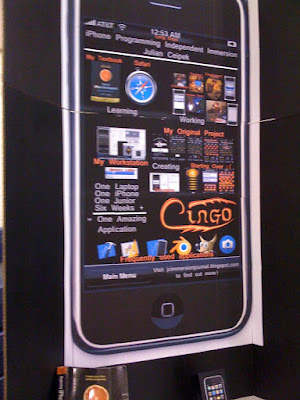
As I explained in my previous post, there was a presentation of all of my school's (Miami Valley School, Dayton OH) "Immersion" projects, including my own iPhone Immersion. Some images from the event are shown below:

My gigantic iPhone poster (made in Photoshop Elements). It consists of two stacked trifold boards:

My laptop running the iPhone Simulator and displaying my game's website (cingothegame.blogspot.com):

(Left to Right) Me and Mr. Collias, one of my programming advisors:

Here I am explaining my project to a younger student:

I submitted CINGO! to the App Store on the 3rd of April with the description/support website cingothegame.blogspot.com. I hope that it will become available soon. Its current price is $0.00!

Sunday, March 29, 2009

Post Immersion Update 0001

CINGO! has exited the Pre-Alpha stage, passed Alpha testing, and is now called 'Imp' Beta 0.1 (Each future release will be named after a mythical creature).

Below are some screenshots of the final product for your enjoyment:

The Game Screen (Note that pieces about to be captured are clearly denoted with a red X for the turn duration):

The Change Appearance Screen now has support for the legacy 'Alpha' look from my old version:

New Instructions View (Note the helpful images at the bottom of the screen are much clearer than in the old version):

When I present my project on the 7th of April, I will try to post some images from the event. Today, I used Photoshop Elements to create a 2ft wide iPhone that I then pasted onto two stacked poster boards. I am certain that this will draw enough attention that people will actually come to see what I did; technology-based immersion projects are generally not viewed by many people because the projects have a lack of visual appeal in comparison to those involving pictures of journeys and artistic creations.

Monday, March 23, 2009

Post Immersion Update 0000

Ladies and Gentlemen......

After days of struggling, I have finally added Data Persistence to Cingo. After asking a question on a programming forum called Stack Overflow, I realized that I had to re-engineer my entire application. For the past few days, I spent much of my time recoding Cingo from scratch. Doing so has allowed me to make a much more intuitive interface, to make my code more compact and understandable, and to add data persistence.

I have also begun making a nicer icon-set, have found a way to get rid of the annoying 'Execute Move' button, and have produced a beautiful logo using Blender 3D.

Here is a quick preview of the new main menu:


...and some of the new pieces in the change appearance screen:

Friday, March 13, 2009

Today, I planned to finish data persistence and finalize my application. After many hours of coding and debugging, I was still unable to save and load data effectively. While the data appears fine after loading, my program throws random memory access errors no matter what I do, and locating these errors is practically impossible because they are not reproducible. I also met with Mr.Collias for the last time during this project, but he was unable to help me discover how to fix the errors. He suggested that I should ask questions on programming forums. I will see what I can do on the weekend, but I still have to finish an essay and take the SAT.
My application works very well, it just loses undo functionality when the view is changed and does not save games when terminated.


Quick Update (9:59):
The "Tie" functionality was broken, and I just fixed it.

Thursday, March 12, 2009

iPhone Journal (asc(Q)-63)

I only have one day of my uninterrupted programming experience left. Today, I planned to complete the views of my application and to begin working on saving data. I started out by filling the New Game screen, without which the application would be basically useless. Then, I met several people who fall within the target age group and asked them to test the application. It was very useful to observe their interactions with the menu systems and controls, and I was then able to change the interface to more closely match what people expect. For example, none of my test subjects was able to locate the way to view the instructions without searching for several seconds. Instead of using the arrows on the screen to move on, they clicked on the white section of the screen where the word "Instructions" appears. I thus placed an invisible button on this section and moved all of the arrows away from the toolbar onto the individual instruction pages.
I also caused the change appearance view to function mechanically (it still needs some aesthetic improvements such as a piece and board appearance browser) and started to rearrange my code for ease of saving key variables. In the process, I was able to fix large amounts of memory leaks and managed to discover that the >100 unused variable messages that I had been receiving were due to some variable declarations that were being imported into almost every file in my project. Finally, I began implementing data persistence itself by creating an object meant to house the data for one of the views and to save half of my data to it. The important steps now are to create a new object for storing the rest of my data and to actually save to/load from the hard drive on the iPhone.


(Note the red background squares. These result from a board appearance setting - the only one other than the default so far)

(This message is displayed when New Game is pressed and a game is in progress. Yes, I realized I misspelled "want." I fixed it in the latest Debug Build)

(The switch in this view is for controlling whether the controls are described in the game view once Begin Game is pressed. I noticed that none of my test subjects pressed the help button purposefully. The default setting is ON to make sure people know how to use the controls.)


Quick Update (12:22):

Just wanted to finish this view really quickly. Goodnight!

Wednesday, March 11, 2009

iPhone Journal (asc(R)-65)


Today, I planned to finish the undo functionality, add instructions, and to reduce memory leaks. I was able to accomplish all this and more. I finished the undo button much more rapidly than I had hoped and reduced some of the memory problems at the same time. I then created the instructions view. I soon discovered that the instructions cannot all be displayed on the same page, and so I modified the view controller for the instructions to handle multiple pages. During this process, I discovered a much simpler way to add and remove views than I had been using previously. I also fixed a major error present in the game view in regard to promoting a diamond to a mixed "power" piece.
Finally, I met with Mr. Collias in order to discuss final changes. He taught me methods of assessing the usability of a user interface and then provided several suggestions about my project's interface and about the gameplay element.
I followed almost all of these suggestions with minor adjustments and now have the following images to demonstrate my progress:

(note the red X on the piece surrounded by diamonds and the dot in the center of the X indicating the final destination of the jump.)

Mr. Collias noted that the score display was confusing and that the execute move button was unclear. Also, it was previously difficult to determine what pieces were removed by a CINGO move and what the destination of a given move is. All of these problems have now been addressed. Note that I also added a question mark icon to the game view that, when pressed, discloses information about how to use the controls.
Tomorrow, I will attempt to finish the "Change Appearance" and "New Game..." views and to begin working on saving the state of the application on view switch/exit.

Quick Update (11:32):
Just added a picker with some randomly named components.

iPhone Journal 0x10

Today (3/10/09), I managed to implement 90% of the "Undo" functionality of Cingo and to fix all of yesterday's bugs after hours of troubleshooting. I was, however, unable to work on any of the other views.
The special move for which the game is named took the longest time to add undo functionality to because the data size is variable - it is possible to surround more than one piece in a single slide or jump. I was also able to take the undo button beyond my early expectations such that it may be pressed until the game looks like it did at the very start. The only move that still needs to be able to be undone is upgrading a diamond to a mixed piece. This can be accomplished with a simple BOOL value, and I used a similar method for allowing jumps to be undone, so this should be a relatively painless process.
I still need to work on removing several memory leaks (see the spikes in the image below) that were introduced due to some strange allocation problems. Tomorrow, I will begin by finishing the undo button, fill the instructions view with information, and see if I can figure out how to remove the leaks. The latter is probably not very important at the moment because of the small quantity of leaks, and I may leave this for later.
I will then work on the change appearance view and new game view if time permits. After that, all that will be left is saving on view switch/exit and adding some other ways to win than capturing all opponent pieces. Everything seems to be coming together nicely at the moment.

(Note: the final spike is from killing the process, not from a lack of deallocation on program exit)

I would post more images, but the application has not changed in appearance, just functionality, since yesterday.

Monday, March 9, 2009

iPhone Journal 0xF

(click on images to enlarge)

Today was the start of the final week of my immersion. As promised, I linked all of the views of my application together so that the buttons at the bottom of each view work properly. I then decided to start working on the suggestions Mr. Collias provided me with. First, I edited the mixed piece icon to be more unique, and then I began to implement the Undo button. I created a linked list of object pointers to store each move and rewrote most of the screen touch code to allow each move to be planned out before completion. As visible in the screenshots below, I have added a special square selector icon that indicates the path a piece will follow as it moves. When the switch button is clicked, it now causes an entire move to be completed. With the progress I have made, actually getting the undo button to do something should not be comparatively difficult.
There are also several bugs to work out, including that a memory access error occurs when attempting to re-plan the path that a piece jumps if the jump consists of several steps. Another problem arises when an already visited square is re-visited by a piece in the same turn. I plan to make this impossible in order to make the game more fair and to reduce user confusion resulting from being unable to tell if a square is to be visited twice or not (note the image with 3 white pieces captured and a mixed piece selected). Although I have not attempted this yet, I imagine that jumping over the same piece twice from different angles with a mixed piece is currently allowed, and I need to prevent this.
I am very glad that I have not yet added data persistence because I would have had to rewrite that code had I already done so.
Tomorrow, I intend to finally remove all of the bugs I can find, finish the undo button, and see if I can get started on adding data persistence. With my newfound experience in adding the linked list functionality, the latter should probably wait until I have populated the other views with content and functionality.


Friday, March 6, 2009

iPhone Journal 0xE

Today, I was not able to make as much progress as I had hoped. While I intended to work on data persistence, I spent most of my time experimenting with code in order to change the current view without having to rewrite everything I have already produced. I was eventually able to achieve this with some interesting tricks, but did not have time to actually implement the data displayed on these views, nor did I have time to fully connect everything. By now, however, I know enough to finish this process with relative ease.
I also met with Mr. Collias today, and he provided me with some very useful feedback on usability, features, and overall look. He suggested making more of a distinction between the appearance of the pieces, producing less of a blending between the pieces and the board in terms of color, and adding undo and replay options. Furthermore, he provided a solution for making the "switch turn" button less frustrating/ambiguous and indicated that the square borders are too large.
I now hope to use me newfound knowledge of switching views to finish the interface and to use some of Mr. Collias' suggestions to make the game more playable. I then plan to finally work on data persistence.

(Sorry, no screenshots today; they would just consist of different views with short labels like "Instruction View")

Thursday, March 5, 2009

iPhone Journal 0xD


Once again, I exceeded my expectations. I finished all of the movement and jumping code, allowed for the "CINGO" move, added the ability to promote diamond pieces reaching the other side of the board, and even added a current player indicator and two counters that display the amount of pieces that each player has captured. I have allowed the iPhone to determine when a player has won, but this code does not yet take into account all possible ways to win, just the simplest.
Nevertheless, the game logic is essentially done and I now need to start working on a feature that I have used for only one application, and then did not fully understand: data persistence. I will also have to start implementing the three other views that the application will have when it is done: a new game panel for setting game preferences and beginning a new game, the change appearance panel that will allow the appearance of the pieces and board to be changed, and the information panel, which will display game instructions in a simple, readable format. I will most likely work on these in reverse order so that I will gradually become more comfortable with the code involved.
By the way, please do not judge my ability at CINGO from the video at the top of this post; it is intended to demonstrate all of the features I have currently implemented as quickly as possible, and not to demonstrate my strategic skill.

iPhone Journal 0xC

I have made immeasurable progress today! I planned to write the code for tapping a piece to select it and then tapping a different spot to move it there. In fact, I was able to finish this in the morning and early afternoon. I then limited piece selection to pieces of the correct color based on whose turn it is in the game. I implemented all of the code necessary to allow a piece to make multiple jumps but not multiple moves and then expanded the code to limit movement options based on piece type. Finally, I added the ability to capture enemy pieces by jumping over them and learned how to use Xcode's integrated debugger when my application froze and complained about memory access errors (I was trying to deallocate memory to free up RAM and ended up releasing several pointers that pointed to memory I actually needed). In addition to this movement code, I also added a button that switches the current player after a turn is complete to allow multiple jumps while not giving the user a hint as to jumps being available. A direct screenshot from my physical iPhone is presented below (Note that the white, circular pieces appear more distinct when viewed on the iPhone screen):


When I get back to work at a more reasonable time of day, I will try to finish the game-logic by allowing the "CINGO" move to be made (capturing a surrounded piece), will allow diamond pieces to become mixed pieces by reaching the other side of the board, will add code to keep track of captured pieces, and will make certain that it is actually possible to win.
After that, I will begin to work on a captured piece indicator, a current player indicator, and data persistence so that the game will be saved if quit, but I will certainly not have time to finish implementing these features. I also hope to add a short movie demonstration of moving pieces that I will add to my next journal.

Wednesday, March 4, 2009

iPhone Journal 0xB

As planned, I worked on movement animation today. I gained a better understanding of how Quartz 2D works and that at no point does the programmer actually refresh the screen; it is refreshed after the function that must contain all of an applications drawing commands. This made it incredibly difficult to create a framework for piece movement, but I at last succeeded by creating a special function that fires 24 times/second. I managed to make the drawing code incredibly efficient such that it only redraws the graphics for the region directly affected by moving a piece. I also determined how to detect where the user presses on the screen and wrote pseudocode for the function that will handle this information. The video clip below is a demonstration of me clicking a test button that is tied to smoothly animating the motion of a piece on the board. While it may not seem very significant, the true changes are visible only in the code; the same animation function that performs the movement in the video can be applied to any piece movement on the screen, even jumps.


I am very glad that I began working on this project earlier than I had intended because of all of the unforeseen problems I have encountered already and will encounter in the future. The experience of producing the application has also taught me many aspects of the Objective-C language that are not even mentioned in my textbook. Programming forums are a great reference for what commands can be used to achieve specific effects. I am getting used to using Apple's technical API documentation as well.
Tomorrow, I plan to implement most of the selection and movement code that is inherent in every move of Cingo. I shall also expand on the foundational code I wrote today to start building some of the logic functions.

Monday, March 2, 2009

iPhone Journal 0xA

After a short break on the weekend, I was able to continue working on my iPhone project with a fresh mindset. As planned, I worked on one of the graphics chapters in my textbook. To my delight, Quartz 2D, Apple's simplified graphics system for drawing on the iPhone seems capable of handling the drawing required for a board game such as my final project, Cingo. I went through the code of setting up the drawing canvas and progressed towards drawing lines of various colors, as shown below, yet I believed that I could better manage my time by skipping the repetitive sections of the chapter and looking in detail at the ones I will be using in my application.
At one point in coding the example project, I was given a ridiculous error by the compiler, something along the lines of "Unable to read symbols for "/System/Library/Frameworks/UIKit.framework/UIKit" (file not found)." This is completely meaningless as the UIKit framework was certainly included in my project. After over an hour of searching online, I was able to determine that this error results when the interface is set up incorrectly, but rebuilding the interface did not alleviate the problem. Suddenly, I glanced at a seemingly harmless warning message that I got when compiling. The entire problem was caused by forgetting an @ symbol before the quotes of a string constant.


I became frustrated with the sample application and so began to experiment with the pre-made example to see what I could do with images in Quartz 2D. Some simple tests confirmed that the API supports transparency, but that a static image may not be placed below the drawing view (canvas).
After I had sufficient knowledge of Quartz 2D for my current purpose, I began to lay out in my mind the features and structure that the Cingo application will have. Thereafter, I began to code the board drawing functionality and to design the board and pieces. A screenshot of the applications I used in this process is shown below:
On the left is the current simulation of the interface after compilation, Xcode is running in the background, and Interface Builder consists of the black window and the lower right window underneath that containing the board. I used Blender 3D to quickly render the pieces and board, and then modified these images slightly using GIMP and Preview to make them fit on the iPhone screen in a presentable format.


Tomorrow, I intend to start studying/implementing several of the following topics:
Data Persistence (save on exit), moving a piece from square to square smoothly, using a series of sprites for animation, detecting finger taps/slides, coding application logic, and creating a useable interface. I cannot meet with Mr. Collias or any of the people in his team on Wednesday, so I plan to do so only on Friday; doing so tomorrow or on Thursday is pointless. Next week, I plan to have learned most of the basic concepts I will need and will then finalize my project along with a presentation and a final essay combining my experiences.

Friday, February 27, 2009

iPhone Journal 0000 1001

My objective today was to begin chapter 8 of Beginning iPhone Development: Exploring the iPhone SDK by Dave Mark and Jeff LaMarche and to meet with Mr. Collias' programming team. The day was more productive than I had anticipated.
In the morning, I learned about the implementation of tables, which are to be found in virtually every iPhone Application. Screenshots of a sample application I altered slightly are provided below.


Later, I spoke to Mr. Collias and Mr. Morelock about the problems I encountered over the course of the week and about what application would be suited for my final project. Mr. Collias explained good programming practices and warned me that I should never lose sight of the final goal of satisfying consumers and fulfilling the project goal in the midst of "fancy" code that is difficult to understand for others. Furthermore, efficiency may be slightly sacrificed for the goal of making code unfocused and capable of solving more than its goal. This allows for reusability when the project is inevitably expanded or when a similar application must be produced. Additionally, he was able to tell me from experience that interface code is constantly changing, but the underlying logic and languages change much more slowly. As a result, logic should be implemented in its own section such that a program may be deployed on a multitude of machines and operating systems by switching out the interface code while maintaining the basic program structure. This is especially important in a corporate environment, when efficiency is greatly reduced if code needs to be completely rewritten and tested due to initial bad programming decisions. Programs should always be planned out, and both Mr. Collias and David Malan, the Harvard professor teaching the CS50 course agree that programs must begin with a basic set of functionality that can be expanded only when it all works properly. Mr. Malan advocates taking "baby steps" to facilitate the debugging process.
In regard to my final project, I suggested both my "Blobs and Globs" application and my "Cingo" board game for porting to the iPhone. The result of a long discussion with Mr. Collias was that "Blobs and Globs" would be an amazing application, but I do not have time to fully complete all of the physical interaction logic between game particles in addition to learning Open GL for drawing and finally coding a sophisticated AI for determining the correct times to maintain defensive versus offensive play. For maximum effectiveness, an AI would have to assess distances between a multitude of particles and evaluate the structure of the particles relative to each other. A two player variant would require learning internet communication protocols. To do this project justice, I will have to work on it during Spring and Summer breaks from school.
It would be more beneficial for me to work on my board game concept which I currently could implement, even though I do not yet have the experience needed to draw moving images on an iPhone screen. Realistically, I will be able to advance to this point and an application of this type has plenty of room for improvement. Updates could include a one player variant against a computer opponent and a polished interface.
I also spoke to Mr. Morelock about some of my less general programming questions. He told me about specific bad programming practices and cited an example of a zip code application that included reading the last four digits of a zip code with code similar to the following:

int fullZipCode = zip; // zip is some number ending with a more specific 4 digit code
int zip4;
int *zipPointer;
zipPointer = &fullZipCode;
zip4 = *(zip + 4);

This code takes advantage of the fact that an integer is stored in memory "on the stack" in one block and reads the last 4 digits from memory directly. In another example, a programmer broke an application by writing to the first memory location, against which pointers are often checked to see if they do not point to anything. Altering memory can be extremely dangerous, which is why newer languages such as C#, .net, and objective-C attempt to prevent such code, which is extremely prone to security flaws.
Mr. Morelock demonstrated how to put Apple's documentation system to good use and was able to explain how objective-C classes can be made to conform to "protocols," the concept of which I had previously found confusing. He suggested that I begin making selective decisions about which chapters to read in my textbook and that I should start working on my final project earlier than what I had intended because from his experience applications usually take twice as long to write as planned. I can certainly verify this; it took me upwards of ten hours to write my checkers application when I had planned to take three. At the end of our meeting, we discussed board game AI, and he mentioned that he works with systems that are based on similar principles. When analyzing a string of text that contains a company name, probabilities of items in the string are assigned based on word location and relative location to prevent a computer from evaluating a location or a department name contained in the string as a company name. The problem is made more complex when the company name is abbreviated or contains a hyphen. For example, hyphens are often used to separate legal department names from company names, and always relying on this can cause a company name to be chopped in half.

For continued progress, I plan to start sketching out the basic specifications of the "Cingo" application and to read about and experiment with graphics functions for drawing the board of the game.

iPhone Journal 0000 1000

Today (2/26/08), I planned to get further in my textbook and to plan part of my final project, for which I had some ideas yesterday.
A few years ago, when I was first examining programming concepts using a graphical programming language, I played a game with a friend in which we each tried to use replicating objects to fill a screen as quickly as possible with as few commands as possible. The result of this evolved into an extremely addicting computer game for two players, "Blobs and Globs." Today, we spoke together about the physics that would be involved in simulating fluid on a tilting plane with friction such that a mobile device such as the iPhone could handle the required calculations of an updated version. The only problems with the game in its current form is that a one player implementation is not as good as would be possible with a language such as objective-C, and movement was possible only with two sets of keys that could not be held down to move characters; the key buffer was essentially of length one.
Using the iPhone and its unique accelerometer controls could improve that game to a very high degree and produce a fun game-playing experience. However, creating this game will likely require me to gain at least a beginner's understanding of OpenGL ES, a low level graphics API. In case I am unable to reach this point by the end of this project, I invented a board game several years ago. It is easy to learn, yet very difficult to master, involving strategies at a similar level as Chess. I could easily create an application for the iPhone that implements this game, "Cingo," in two player form. The problem with this app would be training a computer player to be a challenging opponent. Furthermore, the amount of people interested in board games is sadly much smaller than the amount interested in short addicting games with a simple premise.
Finally, I reached what seems to be the end of the C portion of the CS50 Harvard Lectures and finished chapter 7 in my textbook. While I intended to make progress into chapter 8, the final step of the chapter, which is simply to import the AudioToolbox framework into the project proved to be a painful experience. After adding it and pressing compile, the compiler informed me of 416 errors of the type "Syntax error before...". I tried compiling the version included with the book successfully, but deleting the framework in the provided project and reimporting produced the same error. I searched online extensively, and yet no one seemed to have reached the same error. After multiple application restarts, computer restarts, "Clean all Targets" commands, and a great deal of trial and error, I copied all of the files in my project to a blank project. Upon compiling, I got only 7 errors, which I fixed by adding two #import statements. However, when I launched my application, I got a black screen. At that point, I realized that both the new and old projects were likely irreversibly broken, and I am only glad that I have sample code available that does essentially what my application was intended to.
In the future, I will never make any changes to frameworks without making a project backup first. There is no "undo" option to reverse a process of that nature.
Tomorrow, I will forge ahead in chapter 8 and will get an opportunity to ask questions of Mr.Collias' team of programmers. Maybe they will be able to figure out what went wrong with my chapter 7 project.

Thursday, February 26, 2009

iPhone Journal 0111

On Wednesday, 2/25/08, I planned to get further in my textbook and to discover exactly what @property and @synthesize do in Objective-C. I was able to finish the 9th of 13 weeks of CS50 lectures, determined exactly how the two commands listed above work, and fixed several bugs in my Checkers program. I also completed 4/5 of chapter 7 in my textbook.
I am starting to wonder if I will be able to finish working through all of the chapters in the textbook (chapters 7-9 are particularly long), but conversely, am learning more of the C and Objective-C languages than I ever expected to. Writing the Checkers program gave me a great deal of insight into the foundation of iPhone applications, which has allowed me to understand the previous textbook chapters to an unprecedented level. Some screenshots of the chapter 7 application are provided below:


On Thursday, I intend to continue working in my textbook and to see if I can complete a final project idea based on a strategy board game I invented and recently remembered.